Schedule once. Publish everywhere, on autopilot.
PostZenly plans, queues, and auto-publishes your content to Instagram, TikTok, Facebook, YouTube, Pinterest, and X — while you get on with your day. No reminders to tap, no phone required.
Free plan forever · No credit card · Cancel anytime
Every network. One scheduler.
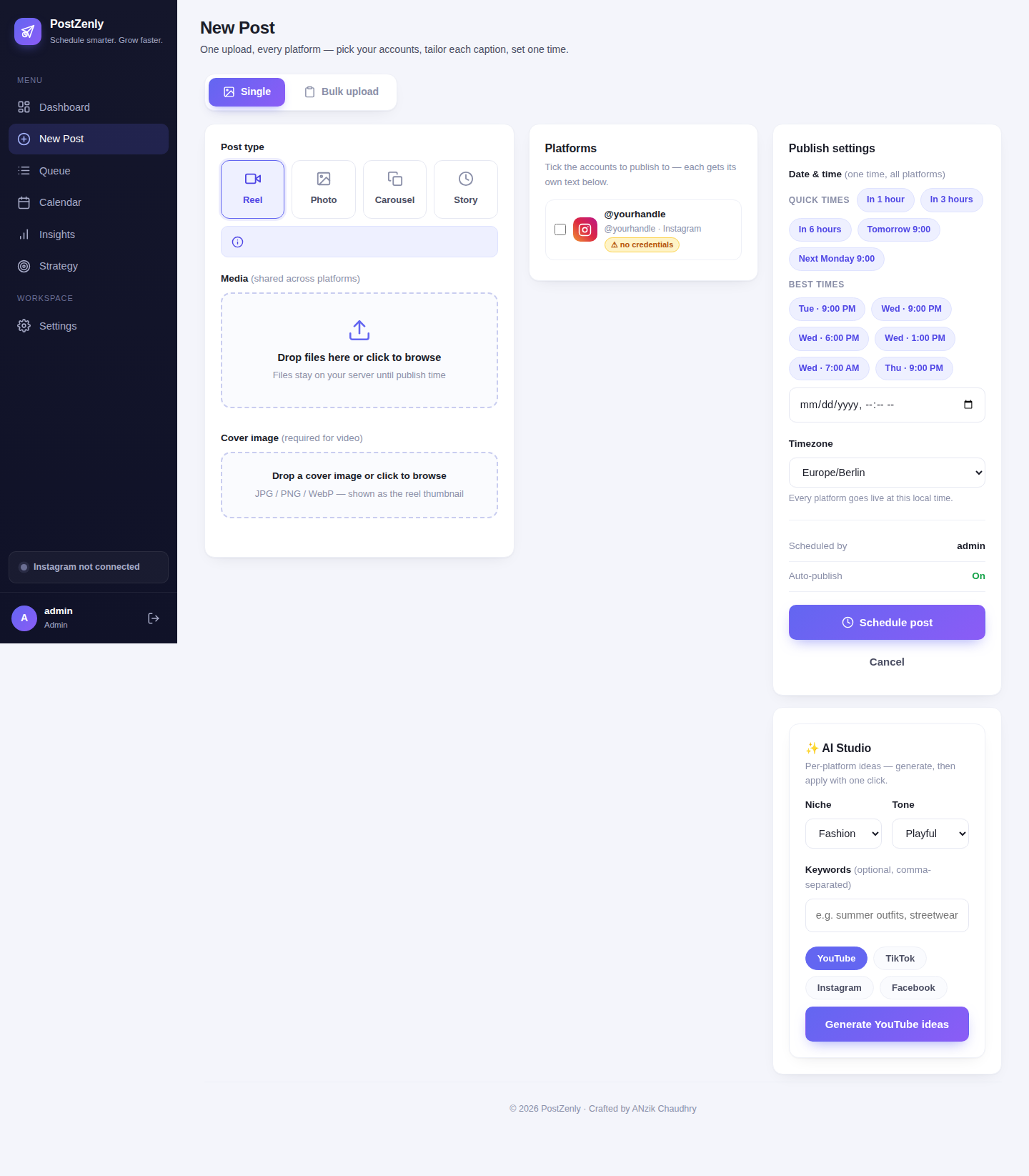
Connect your accounts once. Every format each network supports, scheduled from a single queue.
From idea to autopilot in three steps
No spreadsheets, no phone reminders, no 11pm panic-posting.
Connect your accounts
One-click OAuth for every platform, through the official APIs. Connect multiple accounts per network — your brand, your clients, your side projects — all in one place.
Compose & queue
Write once in the composer, then tune per platform: hashtags for Instagram, a tighter cut for X, a keyword-rich description for YouTube. AI drafts captions in your voice when you're stuck.
Auto-publish & relax
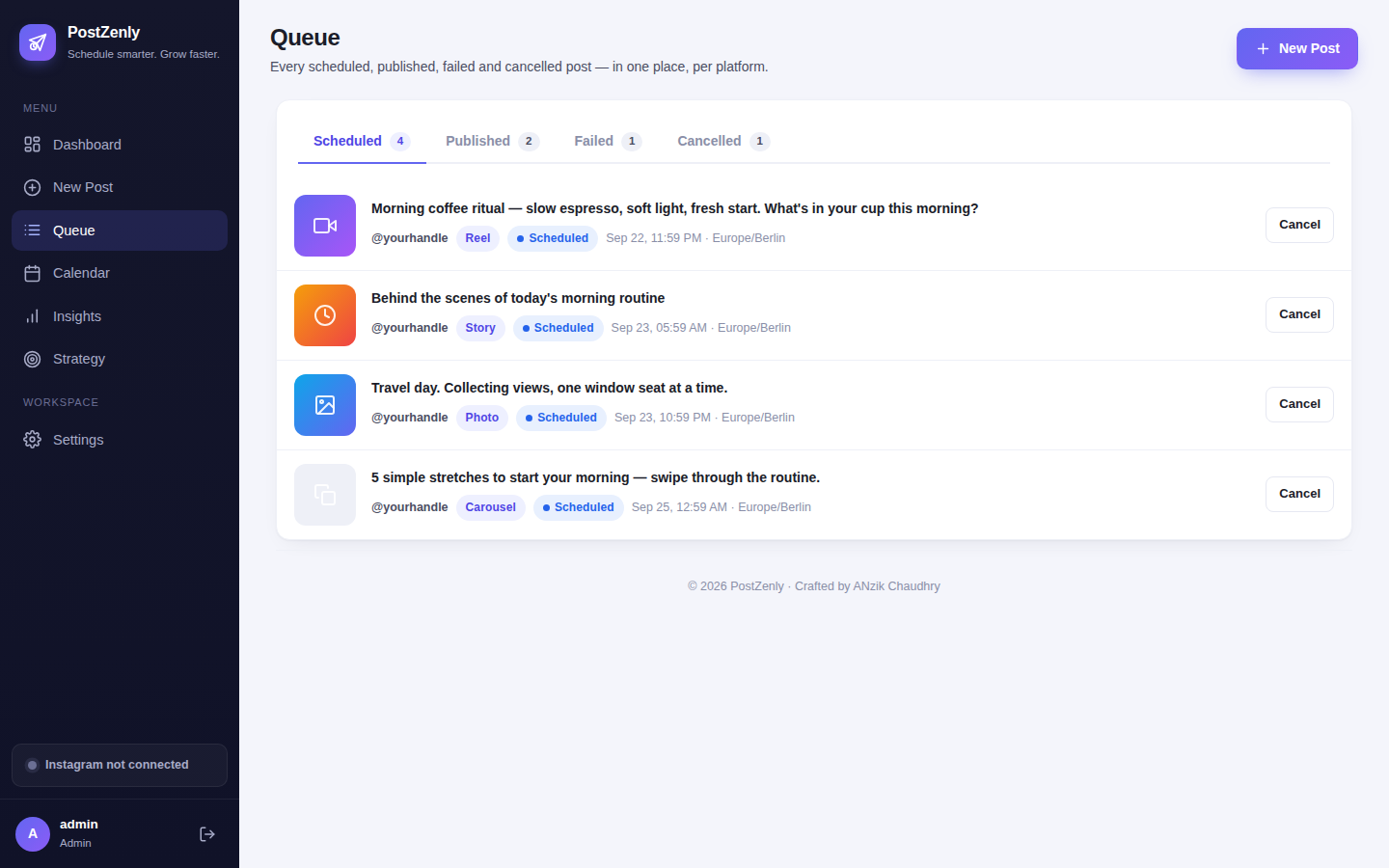
Posts go live at the exact time you set — nothing left to tap on your phone. If one platform fails, the rest still publish, and the failure is flagged with the reason.
Set it once. It posts itself.
Scheduling is only half the job. PostZenly finishes it — through the official APIs, at the exact minute you chose.
- ✓True auto-publishingOnce a post is scheduled, it goes live on its own. No push notification, no tap-to-post step, no phone required — the work ends when you click schedule.
- ✓Smart queueDrop posts into a queue and let them roll out on your rhythm — daily, weekdays only, or your own custom slots. Change the rhythm once; every queued post follows.
- ✓Per-platform retryIf Instagram hiccups, your TikTok and Facebook posts still go out. Failures are flagged in the queue with the exact reason, so you fix and retry instead of guessing.
- ✓Timezone-awareSchedule in your audience's timezone, not yours. PostZenly handles the conversion, so 9am means 9am where your followers actually are.
- ✓Bulk CSV uploadA month of posts in one file. Fill the template — scheduled_at, caption, media, platforms — upload, review on the calendar, done. Up to 500 rows per file on Agency.
- ✓Evergreen recyclingYour best posts shouldn't die after one publish. Evergreen rules automatically re-queue top performers on a schedule you control. (Growth and Agency plans)
One composer that speaks every platform.
Write once. Sound native everywhere — each network gets its own version.
- ✓Per-platform fieldsEach network gets its own caption, hashtags, and settings inside one composer. Tab between platforms instead of rewriting the same post six times.
- ✓AI captions in your voiceStuck on words? AI drafts per-platform captions and hashtags from a one-line brief, tuned to your tone. You approve everything before it schedules.
- ✓First commentKeep captions clean and put the hashtags where they belong. Schedule the first comment on Instagram, Facebook, and YouTube posts. (Creator and up)
- ✓Saved hashtag setsBuild hashtag groups once — launch tags, niche tags, branded tags — and drop them into any post in one click. Unlimited sets on Growth and Agency.
- ✓Quick slotsYour best posting times, saved as one-click slots. Tuesday 9am, every week? One tap — no calendar math.
- ✓Media libraryEvery image and video you've uploaded, searchable and reusable. Upload once, attach to any future post without digging through folders.
Posting by hand is a part-time job you didn't apply for
Here's what changes when a scheduler does the repetitive work.
| PostZenly scheduler | Posting manually | |
|---|---|---|
| Plan a week of content | ✓ One focused session, then done | ✗ an hour a day, every day |
| Publish at the right time | ✓ Scheduled to the minute — even 3am | ✗ whenever you remember (usually late) |
| Post to 6 platforms | ✓ One composer, one click | ✗ six apps, six uploads, six captions |
| Fix a mistake | ✓ Edit once, before it publishes | ✗ delete and repost everywhere |
| Never miss a day | ✓ Queue keeps publishing while you're offline | ✗ missed days whenever life happens |
| Time spent per week | ✓ Under an hour | ✗ 10+ hours of repetitive posting |
| Risk of burnout | ✓ None — the system carries the routine | ✗ high — consistency depends on willpower |
Manual posting doesn't scale — it just gets louder. A scheduler turns posting from a daily chore into one weekly session.
Your first scheduled post is 5 minutes away.
Connect an account, write a post, pick a time. That's the whole setup.
Scheduling, explained plainly
No jargon. Just what it is and how it works.
What is a social media scheduler?
Software that publishes your posts for you at times you choose in advance. You do the creative work in one batch; the scheduler handles the repetitive publishing across every platform.
Scheduling vs auto-posting
Done right, they're the same thing: you pick the time, the tool publishes. The difference that matters is whether anything is left for you to do — with true auto-publishing, the answer is nothing. No reminders, no tap-to-post.
Is scheduling safe for my accounts?
Yes, when it uses official APIs — which PostZenly does. Accounts connect through each platform's own OAuth flow, the same secure method the platforms built for tools like this. We never ask for your passwords.
What happens if a post fails on one platform?
One platform's failure never blocks the others — the rest still publish. The failed post stays in your queue, flagged with the exact reason, so you can fix the caption, swap the media, and retry.
Can I really do this for free?
The free plan schedules 10 posts a month across 3 social accounts, forever, no credit card. When you outgrow it, Creator is $12 a month — and every paid plan starts with a 14-day Growth trial.
Built for everyone who posts
From solo creators to full agencies — one scheduler, every workflow.
Creators
Batch a week's content in one sitting, then spend the week creating instead of posting.
Small businesses
Stay visible every day without hiring a social media person. Ten posts a month, free, forever.
Social media managers
Run every client from one queue — approvals before anything goes live, per-post analytics after.
Agencies
Ten brands, fifty accounts, fifteen seats — one flat price, with client-friendly review roles.
Scheduling questions, answered
Everything you need to know before your first scheduled post.
What is a social media scheduler?
Do scheduled posts really publish by themselves?
Which platforms does PostZenly publish to?
Is it safe? Will my accounts get flagged?
Can I schedule Instagram Stories and Reels?
What happens when the free trial ends?
Can my team review posts before they publish?
Can I edit a post after scheduling it?
How is this different from Meta Business Suite?
Stop posting by hand.
Your content calendar is one focused session away.
Free plan forever · No credit card · Cancel anytime